Showing posts with label Wireless. Show all posts

Wireless Extenders zBoost YX545 SOHO Dual-Band Cell Phone Signal Booster for Home and Office (White, North America and Canada) by Wireless Extender


Satisfy all your cellular phone needs with the Wireless Extenders YX545 zBoost zP Wireless Booster, which works with both cellular frequencies (800 and 1900 MHz) and can extend cellular coverage up to 3000 square feet. This unit can handle signals from all the major cellular carriers.* The package includes everything you need: amplifier base Mini-RG59 cable, signal antenna and mounting hardware. The omni-directional signal antenna receives signals from multiple cell towers.


*The use of radio distribution equipment that enhances, extends or amplifies a wireless signal may be prohibited without the consent of the wireless carrier upon whose network such equipment will be used. You should consult with your carrier before purchasing such equipment to use with that carrier’s service.


Using a revolutionary, patent pending technology that protects the carrier network, the YX545 improves indoor cell phone coverage by capturing and repeating the outside signal, bringing it into the building and enhancing it. This process creates a "Cell Zone" in your home or office.


The Wireless Extenders zBoost system includes:
  • Outdoor antenna (repeats the signal) can be installed outdoors above the roofline or indoors in the attic or near a window
  • Coax cable (Mini-RG59) connects from the outdoor antenna to the base unit
  • Base unit: Sleekly designed, it amplifies the signal and provides oscillation detection/correction which protects the carrier network using patent-pending technology.
  • Indoor antenna connects to the base unit to repeat the signal and create "Cell Zone"--no physical connection to the phone is needed.
Installation
Choosing the best location for installation of the Signal Antenna provides the best performance and the largest area of improved signal. Determine the location that provides the strongest signal using the signal strength indicator on your cell phone. For the best reception, find the location that provides the most bars of signal strength and locate the Signal Antenna at that location.


Specifications
PCS Band
  • Frequency: Uplink: 1850 to 1910 MHz | Downlink: 1930 to 1990 MHz
  • System Gain: 60dB
  • PCS band supported: A, D, B, E, F, C
  • Networks: CDMA, GSM, GPRS, EDGE, EVDO, 1xRTT, UMTS, HSPA, 3G
Cellular Band
  • Frequency: Uplink: 824 to 849 MHz | Downlink: 869 to 894 MHz
  • System Gain: 60dB
  • PCS band supported: A, B, A', B'
  • Networks: CDMA, GSM, GPRS, EDGE, EVDO, 1xRTT, UMTS, HSPA, 3G
General
  • Coverage (open areas): Up to 3,000 square feet
  • Dimensions: 5 x 7 x 1.25 inches
  • Weight: 9 ounces
  • Power consumption: 3W standby; 7W max signal; 2.0A Max

Reviewed By D. Matheny (Austin, TX)

This review ran a bit longer than I expected, so let me sum it up by saying that this zBoost SOHO YX545 did exactly what I needed it to. It boosts the signal quality in my house from at most 2 bars to a solid 5 and didn't require any complicated setup or configuration. It isn't often that a plug-and-play device like this truly beats out all expectations! 

The main thing to keep in mind during the install is that the external antenna and base station need to be seperated as much as possible. The reason for this is that they both use the same frequencies for communication, and having them close together will cause feedback. When the zBoost detects feedback, it turns down its internal antenna strength; which can seriously impact the range you will get from the zBoost. 

Now, on to the details: 

I live in a 2 story, 3000 square foot house with a radiant barrier installed in the attic. The radiant barrier is great for keeping utility costs down, but it wreaks havoc on the cell signal in the house. Because of that, I'm lucky to get 1 or 2 bars inside, with constant missed and dropped calls, even though the signal quality outside is just fine. 

For the last 3 years I've been working from home and using an AT&T cell phone as my primary work number. This has led me to try all types of methods to boost my cell signal, and I'm often forced to take work calls in the yard since it's the only place where my phone works. 

Last week I discovered the zBoost SOHO YX545 and decided to give it a try. One of the first things I noticed after unpacking it was that the 50' extension cable seemed extremely thin and poorly insulated compared to a standard coax/RG6 cable. I decided I'd use it anyway, so I headed up to the roof to find a place with a good cell signal. The antenna was extremely easy to mount - I basically used the included screws to mount it to my chimney in a place where it looked like there was a good signal. 

After mounting the antenna, I ran the included COAX cable down through the attic and to a central place on the first floor. I plugged it in and it started up immediately, no configuration or long boot process at all. I checked my phone and, honestly, I wasn't very impressed. In fact, my signal wasn't much better than what it had been before. 

At that point I was a bit frustrated, but decided not to give up yet. I went back to the roof to verify the antenna location and it turned out I hadn't picked a very good spot. I moved it and went back in to test again. The second time, my signal was better; but it dropped off quickly just a few feet away from the zBoost device. 

This whole time, the quality of the 50' extension cable had been in the back of my mind - so I decided to replace it with a better-insulated RG6 cable. I also decided to go with a 35' cable just to keep the cable run to a minimum. Running the replacement cable was easy enough since I just used a coax coupler to connect the cables and pulled the new cable all the way to the roof - it only took a few minutes. 

Once I had connected the new RG6 cable, I plugged in the zBoost and finally got the results I had been hoping for! My whole house is now bathed with a consistent 4 to 5 bar signal quality, and my cell phone calls are sounding better than they ever have before. This is one of the best investments I've ever made! 

The entire install time was around 5 hours - and that included a trip to Home Depot. If you are just mounting the antenna outside a window, I would expect the install time to be far less. In my case, I always like to run wires through the walls and that can add quite a bit of time - especially going from the roof to the first floor. 

After trying every cell booster device I could find, including the 3G MicroCell from AT&T (which gave good signal strength, but ended up causing far more problems than it solved), I've finally found a device that solves my home's signal issues. I can't say enough good about the zBoost, and I'm happily giving it 5 well-deserved stars. 

If you do buy this, here is a summary of the things that should help you get a better signal boost: 

1) Make sure the antenna truly is in a place that will give you a consistent signal quality. My first attempt at mounting the antenna picked a bad spot because I didn't realize how long my phone takes to update the signal strength meter. The second time, I held it in place for about a minute in each location to be sure I really did have a good signal. 

2) Keep the antenna as fully seperated from the base station as possible - open air distance won't work great for this, but wall and ceiling materials will. In my house, the radiant barrier actually helps the zBoost out since it keeps the base station from seeing the antenna at all. 

3) If your antenna and base station are well seperated and the zBoost signal still seems to be dropping off after only a few feet - try using a better insulated RG6 cable instead of the cable included with the zBoost. My suspicion is that the ultra-thin coax cable was allowing the zBoost base station and the antenna to interfere with each other, even though they were seperated by 2 ceilings, attic insulation, a roof, and the radiant barrier. Fortunately, good RG6 cables can be had for not much money at all. 

4) Remember that shorter cable runs are better than longer runs. For example, avoid using a 50' coax cable for a 25' run. Home Depot will cut cables to custom lengths, and you can probably talk most of the guys into terminating them for you if you don't have the tools. Otherwise, just get a pre-terminated 25' or 50' cable (which is still just a few bucks). 

Overall, I highly recommend this product. If you have a good cell signal outside, but not inside, then this is the product that will solve your connectivity problems!


LG Tone (HBS-700) Wireless Bluetooth Stereo Headset - Retail Packaging - Black/Orange by LG


The LG Tone (HBS-700) Wireless Stereo Headset brings you the high quality audio experience of stereo sound with the convenience of Bluetooth technology. Up to 10 hours of listening/talk time keeps you connected to your music and social life whenever you need it. With its unique form factor and sleek design, the LG Tone has an around-the-neck wearing style, ensuring you comfort throughout the day--ear the LG Tone all day without realizing you even have it on.

The Magnetic Ear Phones snap into place in the stylish, streamlined Memory Flex Neck Strap for easy storage, and they pop out just as easily for comfortable wear. Music controls right on the neck strap mean you can leave your phone in your purse or backpack and still play, pause, rewind, or fast forward.

Wear it at work, while you are shopping, at the park walking your dog, lounging at home, or working out at the gym. Because it's water resistant, you can work out as hard as you want without worrying about breaking a sweat!

You'll never miss a message with LG's free BT Reader app (Android OS), which lets the LG Tone read your incoming text messages in real time. A vibration will alert you of an incoming call and with the intuitive controls located on the neck strap, you can navigate phone calls and media easily without having to physically touch your handset. The LG Tone has multipoint capability, allowing you to stream music from your phone or computer and switch seamlessly to a call on your mobile device all from the neck band controls.

In addition to up to 10 hours of talk and music playing time, the LG Tone offers up to 360 hours (15 days) of standby time. It also includes last number redial, voice dial, call reject, and call waiting functionality (phone dependent).

Key Features

  • Unique around-the-neck design that's lightweight and comfortable for all-day use
  • Exceptional audio with noise suppression and echo cancellation
  • Convenient power slide switch
  • Intuitive talk and music controls
  • Battery status check and vibrating call alerts
  • SMS Reader app (Android OS)
  • Up to 10 hours of talk time
What's in the Box

LG Tone (HBS-700) Wireless Stereo Headset; AC adapter; multi-size ear gels; quick start guide

Technical Details
  • Stereo Bluetooth headset for wireless music plus call functionality
  • Magnetic ear buds snap into place when not in use; music controls on neck strap
  • Free BT Reader app (Android OS) reads your incoming text messages in real time
  • Up to 10 hours of talk time and 15 days of standby time
  • This Wireless Bluetooth Stereo Headset delivers high quality Stereo Audio and Full Calling features in a sleek, comfortable design
  • Water resistant for use with Active Lifestyles

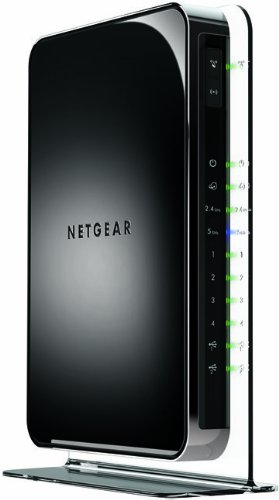
Netgear N900 Wireless Dual Band Gigabit Router (WNDR4500) by Netgear


By David (MASON, OH, United States)

I am an IT professional, author of many technical books, and I work from home and needed a performance upgrade from my older Linksys wireless router (Linksys WRT54G2 Wireless-G Router). So I purchased the Linksys E2500 Advanced Simultaneous Dual-Band Wireless-N Router (from amazon.com) and it was a disaster, see my 1 star review there for details. I packed it up and returned it. Amazon handled the return smoothly as always. I decided never again for Linksys.

As a replacement, I first thought about getting the NETGEAR N750 (WNDR4000) which had great reviews, but I decided that for the small difference in price I'd go for this top model.

I unpacked the Netgear N900 (WNDR4500) and had it installed in about 5 minutes on my home network (with 11 computers and many wireless devices) What I did:

1) I made the cable and power connections, and directly connected a PC to the Netgear router to obtain the configuration information.
'
2) With a web browser I entered the router's web address. The Netgear N900 reported:
* a 2.4GHz Network Name (SSID) : NETGEARxx and password
* a 5GHz Network Name (SSID) :NETGEARxx-5G and password

Also did a firmware update (single click of the notice that it was available)

3) I turned on a wireless laptop (Windows 7) and opened the wireless connections dialog, it listed the NETGEARxx SSID, I logged in (with the previous info.) and was immediately on the internet.

4) AFTER having confirmed that it was working, I logged into the Netgear N900 as administrator (admin/password) and changed the admin password, the SSID names and passwords. (Then made the corresponding changes on my laptop computer in the Windows' networking configuration.)

5) I tested it, did some downloads, Norton and Windows updates and rebooted. Then I went to [...] and watched several of my favorites videos (mostly games) in 720p and 1080p, and the video's played as well as on my direct connection (Road Runner Turbo Internet).

Played my PS3 with the wireless connection (online multiplayer) with several games with no visible lag. Connected my Kindles and they worked well.

Signal strength is excellent: shows 5 bars everywhere in the house, my previous router showed 1 bar (or failed) at some distant points in my home.

This couldn't have been a better experience, great product, fast and I'll update this review in a week to report about the reliability etc.
Great quality, good looking device, has 4 LAN ports and 2 USB ports. Includes an network (CAT5E) cable.

Highly recommended

UPDATE: Thought I'd give an update after several weeks of use. It's great, really worth the price.

We use this router for hours everyday with several laptops, tablets, Kindles, 2 PS3's; have a printer connected, I download software, ebooks, large work related files, view youtube and netflix videos and have seen no dropped connections at all. Signal strength is great. I am puzzled by all the reviews that report problems, couldn't have been happier with this router. I'd buy it again.

EnGenius ESR9855G Wireless Router - IEEE 802.11n (draft). WIFI GIGABIT GAMING ROUTER MEDIA ENHANCED B-ROUT


EnGenius ESR9855G Wireless Router - IEEE 802.11n (draft). WIFI GIGABIT GAMING ROUTER MEDIA ENHANCED B-ROUT
by ENGENIUS TECH

EnGenius ESR9855G Wireless Router - IEEE 802.11n (draft).
WIFI GIGABIT GAMING ROUTER MEDIA ENHANCED B-ROUT


The EnGenius ESR9855G Multimedia Enhanced Wireless 300N Gaming Router is a single-band device, stuffed with advanced features and sporting a sharp management interface. It delivers robust throughput at close range running in 802.11 b/g/n (Mixed) modes, but that throughput falls off at increased distances. Surprisingly, speed actually declined when I set the device on 802.11n only mode. This makes for a router that aims high yet falls short in retaining consistently strong throughput. It's the one big flaw in this otherwise very good  router, which you can get online for about $100.

Specs and Design


The ESR9855G's design is unique among consumer routers. It's a real eye-catcher, with a black, glossy top and a bright orange chassis. Two external 3dBi Dipole antennas attach to both sides of the router. Inside are the Ubicom IP7K + Atheros AR9223 (RF) chipset.

The front panel has LEDs for monitoring power, client connections, WAN and WPA. The rear houses four Gigabit LAN ports, a WAN port, and a power switch.  On top of the unit is a WPS button for easy client connectivity. The bottom of the device has two wall mount sockets.

The design is apparently conducive to cool running, as the router remained cool to the touch after two days of uptime.

Setup and Features 


The setup process, which requires wiring a computer to the device, seems dated when the norm is wireless setup found in routers such as the Cisco Linksys E4200 Maximum Performance Wireless-N Router or Belkin's N750 Wireless Dual-Band N+ Router, but it is still easy and efficient. The router ships with a CD containing the user manual and the EnGenius Smart Wizard, a browser-based interface rather than an executable file.

Setup instructions are very detailed, illustrating how to power up and connect the cables to the router. My WAN settings were picked up right away. By default, the router was configured to run in Mixed mode with no security setup. This may be problematic for less technical users. Routers from Cisco/Linksys and other vendors incorporating security configuration into the initial setup process; it’s just that important. Since EnGenius is marketing this to the savvier gamer set, the omission of security configuration from setup is forgivable.

The interface is sharp. It's clean, and easy to navigate through. The color choices and font-sizing makes it very easy on the eyes. Once the router is set up, the interface allows for further configuration of basic and advanced settings. A wireless wizard within the interface walks users through the basics—changing the SSID and setting up security. Although, as mentioned, security isn't configured during initial setup by default, EnGenius does a good job of conveying what the different security settings mean, with WPA2 listed as "Best."

Advanced settings allow for very granular tweaking of settings that most users won't want to fuss with, such as transmit power and DTIM interval. In between the very basic and very advanced settings are lots of other features in this router. The device offers DHCP, SPI firewall, VPN pass-through, Dynamic DNS, virtual server mapping and port forwarding.

QoS is done with feature called SteamEngine. When enabled, it aids in prioritizing traffic, which is why this is a router targeted for gamers and multimedia enthusiasts.

While some throughput issues stop me short of recommending this as a small business router, there are some capabilities that would be attractive to a small business. For instance, the ESR9855G supports WPA2-Enterprise encryption, and users can establish up to four distinct WLANs.

Performance


The ESR9855G delivered the top throughput I've tested for a single band router. Unfortunately, it also has some of the worst ability to sustain throughput at a distance. Competing single band routers may not be as speedy but some are better at retaining throughput level whether I test 5 feet or 30 feet distance from them.

I did not find any speed improvement by switching the router to all 802.11n mode or using EnGenius' own EUB9801 Wireless USB adapter: In fact, the performance was far inferior with the USB adapter than when testing with my usual HP EliteBook 8440w, which has Intel's Centrino Ultimate-N 6300 AGN adapter and handles high throughput like a champ.

Almost Ingenius


Engenius' router is a very good one, but loses marks for throughput retention. It dropped 49% from its intital throughput by the time I tested at 30 feet. Other routers such as the Cisco Linksys E1200, while not as speedy, were able to keep throughput levels sustained at distance.

There are three key factors to consider when testing routers besides of course features; they are: throughput, the range of throughput and setup process. The ESR9558G would work fine in a smaller space, but based on the drop-off I saw in the benchmarks, I would be worried the Engenius wouldn’t sufficiently cover a larger home or space without aid of a wireless extender.  Our Editors’ Choice pick, the E1200,  does not match the ESR9885G in speed, but it tested better at keeping througput at distance and, of course, features Cisco's easy wireless setup. The ESR9885G still has a convention setup which requires wiring, although, it's a fairly easy process.  Those factors give the E1200 an edge over the Engenius router.

Still, I found Engenuis' router overall impressive and it is the fastest single-band router so far tested. With the caveat that it may not be useful for covering large areas, it would work fine for smaller coverage areas and for gamers' purposes.

Pros
Excellent throughput for a single-band router. Lots of features. Sharp, well-designed interface. Easy setup. Runs cool.

Cons
Throughput drops significantly with distance.

Bottom Line
EnGenius' ESR9855G Multimedia Enhanced Wireless 300N Gaming Router is near flawless save for one issue—after moving a relatively short distance from the device, throughput drops significantly.

Specifications:


Wired Ports 4
Antennas: External Yes
Device Type Router
NAT Yes
Parental Controls No
Stateful Packet Inspection Yes
Quality of Service Yes
Tech Support Phone support.
Security WEP, WPA, WPA2, WPS (Wi-Fi Protected Setup), WPA2-Enterprise
Networking Options 802.11n (2.4 GHz only)

Samara Lynn 
Lead Analyst, Networking


LinkWithin

Related Posts Plugin for WordPress, Blogger...
Ping your blog, website, or RSS feed for Free