Showing posts with label Gadgets. Show all posts

Motorola S10-HD Bluetooth Stereo Headphones by Motorola


Move to the Music: The only stereo headphones designed to go from working out to hanging out.
Behind-the-head design eliminates tangles and provides a light, comfortable fit that’s perfect for music on the go. The Motorola S10-HD is the only Bluetooth stereo headset that provides high-definition audio in a sweat proof design, so your wireless music stays with you in the gym and on-the-go. An advanced design protects against sweat and moisture, and the completely wireless, behind-the-head design eliminates tangles and provides a light, comfortable fit that's perfect for music on the go.

Simple controls on the headphones allow you to adjust volume, change tracks, play/pause your music and take calls--music automatically pauses during calls and resumes after the call. High definition audio ensures you'll enjoy your music in rich surround sound. Plus, with up to 8 hours of play time and 9 hours of talk time, the S10-HD will last through all of life's little adventures. It's compatible with most Bluetooth-enabled mobile phones for taking calls, but it requires a mobile phone or digital audio player with an embedded A2DP Bluetooth profile for stereo music streaming.

Sweat it Out
Optimized for an active lifestyle, the S10-HD uses advanced materials like hydrophobic acoustic mesh in a lightweight, sweat-proof design. The new ear cushion interface protects the speaker from sweat, and silicone seals protect electrical components throughout the headphones. To reduce exposure to moisture, all buttons are co-molded and the micro-USB charging cover is molded to the headphones housing with a waterproof plug. Perfect for your daily workout, outdoor adventure or just when you're out and about, the S10-HD keeps the moisture out and the music flowing.

Let's Get Loud
Never sacrifice audio quality when listening to your tunes on the go. The S10-HD delivers high-definition sound wirelessly right to your ears, for a top-notch listening experience. An advanced acoustic design, digital tuning and enhanced bass deliver rich, clear sound so you can hear your music the way it's meant to be heard.

Hear and Feel the Difference
The S10-HD refines the award-winning design that redefined wireless music. The back housing is redesigned to optimize antenna performance outdoors. An angled wraparound design minimizes the appearance of your headset for a discreet look. Additional ear cushions are included to further optimize your comfort. A secure, comfortable fit will optimize your audio experience. Try the 4 different ear gel sizes that come with the product to find the best fit for you.

You're In Control
Perfectly placed, easy to operate buttons let you play, skip and pause music, adjust volume and answer calls effortlessly. Expecting a call? There's no need to disconnect your headphones--the music will automatically pause when a call comes in, and resume when you hang up.

Specifications
Talk time: Up to 9 hours
Music playback time: Up to 8 hours
Standby time: Up to 10 days
Bluetooth: Version 2.1 with embedded A2DP AVRCP profiles for stereo music streaming
Range: Up to 10 meters (33 feet)
Wired connectivity: USB

What's in the Box
Bluetooth stereo headset, charger, multiple ear bud sizes, wall charger, operating instructions

Technical Details
  • Wireless Bluetooth stereo headphones for streaming audio from compatible mobile phones and MP3 players
  • Hydrophobic mesh, silicone seals and encased speakers provide sweat proof design
  • Behind-the-head design eliminates tangles and provides a light, comfortable fit
  • Try the 4 ear gel sizes included for an optimized fit and audio experience
  • Up to 9 hours of talk time, 8 hours of music playback, and up to 240 hours (10 days) of standby time.


Samsung Galaxy 5.0 Android MP3 Player

Samsung Galaxy 5.0 Android MP3 Player
by Samsung
Samsung Galaxy 5.0 Android MP3 Player


Surf the Internet, take photos, play games, and carry your music, videos, and other media wherever you go with the Samsung Galaxy Player 5.0. Powered by Android 2.3.5, the player features a 1 GHz processor, a beautiful 5-inch touchscreen, and front- and rear-facing cameras. It also gives you access to over 250,000 apps including games, productivity software, and more.

Samsung Galaxy Player 5.0 At a Glance:
  • Brilliant 5-inch touchscreen display
  • 8 GB internal storage with a microSD slot to add more
  • Compact for easy portability
  • Powered by Android 2.3.5 with access to over 250,000 apps
  • Listen to music and watch videos anywhere
  • Includes travel adapter so you can charge the battery away from home
Play On-The-Go Without a Contract or Monthly Fees
The Samsung Galaxy Player 5.0 gives you portable freedom, letting you connect to any Wi-Fi hotspot while on-the-go without any monthly service fees. The player uses a Wi-Fi connection (802.11b/g/n) for Internet access. Once connected, you'll have access to games, music, video, and the whole Internet including Adobe Flash Technology. The sleek player easily fits in any pocket so you can take it everywhere you go.

Beautiful 5-Inch Touchscreen with 8GB Storage for Media Playback, Games, and More
Samsung is a leading manufacturer of displays, and puts their expertise to work by including a beautiful 5-inch touchscreen with WVGA (800x480) resolution. Show off your latest vacation photos or watch your movies in stunning HD. The player has built-in stereo speakers, or you can plug in the included headphones for private listening.

The Samsung Galaxy Player 5.0 includes 8GB of internal storage for your apps and media, and it has a microSD slot so you can add up to 32GB more. The player includes built-in support for MP3, WMA, Ogg, FLAC, and AAC files; avi, mp4, 3gp, wmv, ast, mkv, and flv video files; and JPEG, GIF, BMP, and PNG images. It also has a built-in radio. And when connected to the Internet, you'll have access to your favorite Internet radio, Pandora, and YouTube, so you'll have all the media you can handle.

Front and Rear Cameras for Great Photos and Video Calling
The Samsung Galaxy Player 5.0 features a 3.2 megapixel rear-facing camera for taking photos. With a built-in flash, you'll be able to take crisp clear shots even in suboptimal lighting. Additionally, the VGA front-facing camera lets you make video calls using the Qik application, making it easy to stay in touch with your friends and family while on the go. And because the player features an embedded mic, you can make video calls without having to wear a clunky headset.

Powered by Android 2.3.5 with Over 250,000 Apps
Android 2.3.5 turns your mobile device into an easy-to-use pocket computer. It includes a full web browsing experience and access to more than 250,000 apps through Android Market. These apps include Pandora, Facebook, and tons of games and productivity software, so you can get your work done, listen to music, and keep connected with your friends and family with just one small device.

You'll have the whole Internet thanks to the fast and full featured Android browser that gives you seamless viewing of any webpage, including the latest Adobe Flash Player 10.1. And with ThinkFree Office included, you'll be able to access Word, Excel, and Powerpoint files on the go.

Built-In GPS and Bluetooth Hardware
The Samsung Galaxy Player 5.0 has a built-in GPS, giving you access to GPS positioning and letting you take advantage of location-aware apps. It also has support for Bluetooth 3.0, so you can connect your favorite Bluetooth headsets for hands-free VoIP calls, music listening, and video viewing.

Powerful Rechargeable Battery for All-Day Use
The player uses a lithium polymer battery (included) that provides 2,500mAh of power for all-day use. The battery offers up to 60 hours of audio playback and up to 8 hours of video playback, so you won't have to worry about running out of juice in the middle of watching your favorite movie. Easily charge your player anywhere using the included USB 2.0 cable.

Includes Travel Adapter
An included travel adapter plugs into any standard A/C outlet so you won't need a PC or laptop to charge the player. The adapter features a detachable USB to micro-USB cable.

The Samsung Galaxy Player 5.0 measures 5.56 by 3.07 by 0.46 inches (H x W x D) and weighs just 6.42 ounces. It is backed by a limited one-year warranty.

What's in the Box
Samsung Galaxy Player 5.0, earphones, USB cable, travel adapter, quick start guide.

Features
  • Style: 5" screen
  • Product Features
  • Powered by Android 2.3.5 , with access to over 250,000 apps including games, productivity software, and more
  • Uses a Wi-Fi connection (802.11b/g/n) for Internet access
  • 8 GB internal storage with a microSD card slot for adding up to 32 GB
  • 5-inch touchscreen with WVGA (800x480) resolution
  • 3.2-megapixel rear-facing camera with built-in flash, and a VGA front-facing camera for video calling
Technical Details
Brand Name: Samsung
Model: YP-G70CWY/XAA
Digital Storage Capacity: 8 GB
Display Size: 5 inches
Hardware Platform: PC
Weight: 6.42 Ounces

Here's Samsung Galaxy Selections:


1.
Product Details

11 Used & new from $224.99
(88)
Eligible for FREE Super Saver Shipping and 1 more promotion 


2.
Product Details


6 Used & new from $180.00
(88)
Eligible for FREE Super Saver Shipping and 1 more promotion 

5 Gadget To Accompany You Exercising


Exercise activities will indeed be more fun if done together with friends who have the same hobby sport. But, what if you have to exercise alone?


The answer is to look for gadgets that can be carried and used as a friend to exercise. Here we recommend five gadgets that fit as your friend to drain sweat.


1. Apple iPod Nano


This is the most popular portable music now. Bent is a small, relatively affordable price, storage space large enough capacity to 8GB and 16GB options and accessories which support many media mp3 player an advantage on this one. With a screen-sized mini-inch 1:54, and the relatively small size makes it easy to carry anywhere. There is also a clip-on that can make it easy to fall when you move and exercise. iPod Nano has been equipped with the latest version of the accelerometer which records your data during walking or running. The data can be uploaded to the Nike + website so you can monitor your workout progress.


2. Sony Walkman W260


As one of the pioneer era of portable music, Sony's Walkman lineup retaining those who have such legendary. But in the days of all-digital as now, the Sony Walkman now comes with a variety of models of Walkman series, one of which is the Sony Walkman W260. With a body that directly integrated with an in-ear headphones that will be installed perfectly on your ears will not make it off when asked to move in the gym or running in the park. In addition, the battery resistance is also quite tough though relatively small capacity that is offered with a choice of 2GB and 4GB only. One feature that makes it suitable to be a friend is a feature anticipratan water sports. So you do not have to worry about the Walkman will be damaged if exposed to sweat or rain water. The important thing is not to be invited to swim or dive, yes.


3. Nu Dolphin Swimmer MP3 Player


For those of you who love water sports like swimming but still want to listen to favorite music, Dolphin Swimmer MP3 player from Nu following a mandatory gadget to own. In terms of size, Nu Dolphin Swimmer is very small indeed. For that, you might need extra attention to keep it. Nu Dolphin Swimmer comes in capsule form that resembles a body that is usually attributed to the swimming goggles when you take him swimming. Resistance to water also continues on earphones. Imagined it fun to swim or snorkel while listening to your favorite songs?


4. Liquid Image VideoMask


This one tool may be more suitable for you who want to capture the beautiful moments when you're on the move. Liquid Image comes in various forms that are tailored to the needs. This device is integrated with a camera that can be used to record video and take photos. Liquid Image offers several products that can be used in accordance with the sport that you like. For example Liquid Image Water Sports that cater to diving, Liquid Image Offroad Sports that can be used for those who like to draw the gas in the wild tracks with dirt bike, until the Liquid Image Snow Sports are presented to you who like surfing on snow. The plan, Liquid Image will also complement its product range for the series Motorsports for the hobby racing on the racecourse and Surf series that can be taken against the current wild surf waves on the ocean.


5. Garmin Forerunner 610


Running sports fans certainly must have watches from Garmin follows. Garmin Forerunner 610 is the latest series of watches which comes complete with Garmin GPS feature which comes with a variety of exciting new features in dalamnya.Garmin Forerunner 610 presented with a touch screen that is equipped with features extra resistance to water and the weather is sometimes friendly. It can be used to calculate how far you ran and your heart rate monitor, Garmin Forerunner 610 also features Garmin Connect. Garmin Connect feature can make it easier to enter data time, write down the target, share tips with friends and family, and can also be used to participate in an online fitness community.


Translated by Ian Satya
Writed By Kristian Tjahjono
Kristian Tjahjono, contributors yangcanggih.com consumer technology site. Enthusiastic about the various types of gadgets, ranging from computers, cell phones, to digital cameras.

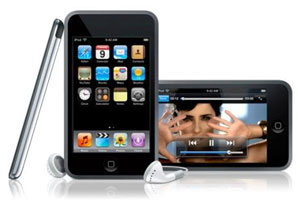
Apple iPod touch 32 GB (4th Generation) by Apple


Having had a chance to spend a little time with a review model gives me a chance to share the experience with you a bit early (before my own arrives). I'll take you hands-on with the new model, plus I'll share from my past two years of iPod touch ownership altogether, especially for those who haven't yet owned (or been owned by) one of these mobile games. I've also hidden a treasure trove of info on how you can legitimately download tons of quality apps for free. First though, let's quickly cover what's new. 


+ Faster 1GHz A4 Processor - to keep up with the high demands of multitasking 
+ Ultra high resolution "Retina display" - packs a 960 x 640 resolution at 326 pixels per inch 
+ 15% larger battery - 3.44 Whr/930 mAh plays 7 hrs of video & 40 hrs of audio 
+ Rear-facing camera - supports 960 x 720 sized photos (0.6 megapixels), plus 720p HD videos 
+ Front-facing VGA-quality camera - VGA-quality is a resolution of 640 x 480 (0.3 megapixels) 
+ 3-Axis Gyroscope - allows for higher precision and more motion gestures 
+ Wireless N - Connect faster and go farther than ever, with this WiFi device (requires a router with 802.11n) 
+ Built in microphone - but Apple reverted back to using the remote- and mic-less earphones 
+ Game Center - Apple's own social gaming platform 
+ Sleep/Power Button - it's been moved to the right, but not improved beyond that 
+ Thinner, lighter than ever 
* Note - Memory remains at the same 256MB despite several unconfirmed sources touting 512MB. There's also no vibrate module. 


Unlike last year's iPod touch update, this one's a complete overhaul to the entire line. Last year, the new models didn't change in appearance. On the inside, faster processors and double-memory were added to the 32GB & 64GB models, but the 8GB got left out. Not this time. Buying the new 8GB iPod touch indeed gets you all the new goodies. You'll also pay thirty bucks more than before, so consider buying the 32GB model instead. You'll get 400% of the storage capacity for only 23% more coin! 


Background
I'm a mobile app developer who's created a few apps and games for the iPhone, iPod Touch and now iPad. I was initially drawn to the iPod touch because of the popularity and capabilities of its mobile Web browsing--I was primarily a Web developer at the time and no other device could surf the Web so well. After I got one, I was hooked. I racked up over a hundred bucks in app purchases within the first month, and before long, I found myself learning how do develop native apps for the device. 


Indeed, if you have never had an iPod touch before, you're in for a real treat. Of course, if you have, then you know first hand: it's is worth its weight in gold--no, in platinum. And now, with the latest generation, it may even be worth its weight rare gem stones! I digress. 


Out With the Old
The iPod touch is frequently called an iPhone without the phone. However, until now there have been several other features also missing in the iPod touch besides the phone: a camera, GPS, magnetometer (compass), and some newer amenities from the iPhone 4: front-facing camera, high resolution "Retina display" as it has been dubbed, and the powerful 1GHz A4 processor--indeed a necessity to keep up with multitasking. 


That all changes, now. The 4th gen iPod touch brings with it some new features and amenities, some of which have been anticipated by iPod touch fans and developers alike, including myself, for several generations of the device. From a developer's perspective, the more hardware features we can get our hands on, the better and more innovative apps we can create, and the more users that can download, use and enjoy them. 


In With the New
The striking new design of the latest iPod touch is definitely a looker. Apple has made it even thinner (and I thought it was already too thin before) complete with a beautiful chrome back. While the super thin design is certainly attractive, I've found it slightly difficult to keep it well-gripped in your hands. The usual chrome back looks great too, but it's scratch-insistent. Yes, it's incredibly easy to scratch it all up, even after the first few days. For these two reasons, definitely get yourself a silicone skin alongside your new touch! 


For ages, the feature topping everyone's wishlist for the iPod touch has been a camera. Check! It handles HD video too--bonus! Granted, its not the 5 megapixel camera that the iPhone 4 sports, but again, the new iPod touch is thinner than ever, making it a miracle that we even got a camera in the first place, let alone two! Yes, Apple went the extra mile so we could make video calls with our iPhone toting friends, via their FaceTime app. Brilliant! So, having not had any camera on the iPod touch before, and now having TWO cameras on it, we can't really complain can we? Nah. 


I'll have details on the quality both cameras later, but what excites me even moreso is the new much-higher resolution screen--dubbed "Retina display". You may not think much of it if you haven't used an iPhone or iPod touch before, nor have an older model nearby to compare it to, but for those that have and/or do, the difference is clear! (pun intended) 


Where this really comes in handy is in browsing the Web and reading non-mobile-formatted PDF e-books. Now, I can see things so much clearer at the default zoom level (which shows the full width of a Web page or document). My vision isn't spectacular by any means, I just don't mind seeing things smaller on the screen. It allows me to see more content without having to scroll. Indeed, the Retina display was the #1 feature I never knew I wanted (until I saw it in the iPhone 4 that is). 


Other newness includes: 15% larger battery, HD video recording and editing, built-in mic, wireless-n for nearly double the WiFi connection speed and distance, Game Center: Apple's new social gaming platform (which seems to be Apple's attempt to kill-off third party social gaming platforms like OpenFeint and Plus+), 3-axis gyroscope sensor, which complements the existing accelerometer sensor, both of which handle the rotating, swinging and other motion gestures of the device (previously, rotation were roughly calculated from accelerometer data), and new placement of the sleep/power button on the right (but still as difficult as ever to press). 


Features still missing include: 512MB of memory, vibration, 5 MP quality camera + flash (iPhone apps now support using LED flash as a flashlight, like Android does), magnetometer (compass), and the GPS. I'd happily trade the thinness of the latest iPod touch to have the GPS. WiFi based location is often inaccurate, and the GPS doesn't need a WiFi or cellular connection, it just needs to see the satellites in the sky. 


So What Can the iPod Touch Actually Do? Well, what can't it do?
The iPod touch is like a magical little box, only it's flat. While it cannot cook your breakfast, yet (I'm sure someone is already working on that), it can indeed do some pretty extraordinary things. It's an amazing catch-all device that can provide hours of entertainment, give you the power of the Web in your hand, and it can even replicate the functionality of countless one-off products. Developers have been creating apps that take advantage of special hardware of the iPod touch to emulate some other product for less, and sometimes even for free. 


Even expensive products have seen cheap iOS based clone apps. For just 99 cents, you can snag a special alarm clock app that monitors your sleep cycle and wakes you up when you're in an ideal state of wakefulness. I spent 350 bucks on an aXbox a few years ago, who's functionality is easily replicated by several "sleep phase" alarm clock apps in the app store. When you do the math there, you see that it's easily a no brainer: buy yourself an iPod touch now! I've listed more apps like this in the comments! 


Plus, with the support of such a strong community of app and game developers, there's never a drought of fresh new apps and games. There's always something to do with the iPod touch, and I guarantee you'll never be bored with it. I honestly cannot say the same thing about Android, though I also tote my EVO 4G around with me. I do admit that the EVO's mobile hotspot comes in incredibly handy for providing the iPod touch with a WiFi connection while I'm on the go). 


Now, with the proper resources, you can legitimately download thousands of high quality apps for free. I do it all the time and it is perfectly legal. See, Apple allows developers to temporarily put their apps on sale (and even drop the price to free). Usually they do this to get you to write some rave reviews for their apps. The secret to success is having the resources to help you spot these special app sales--so you know when and where to get them during their sometimes extremely-limited-time promotions. 


In hopes of making this the most helpful review on Amazon for the iPod touch, here's how to obtain these special promotional-sale apps: 


There are several resources you can use, both on the Web and on the iPod touch itself. I prefer to use the app called BargainBin that lists all apps that recently went on sale or dropped to free. It also supports watch lists with push notifications, and can alert you whenever an app you're interested in goes on sale. It's a phenomenal little gem, and it has gotten me a ton of apps and saved me a fortune! It also has a companion website that lists the same apps (Google: App Advice). There's also a website called AppShopper (Google it) that lists apps with recent price drops and new apps as well, and you can filter just the free products or just the sale products. The two sites don't always list the same apps. Sometimes one will miss something that the other will catch, so it's good to keep track of them both. Check them daily if possible. Several apps are duds, but you'll come across some really great ones from time to time. They'll all add up! 


Web Browsing
Alongside spending lots of money on all those wonderful apps in the App Store, Web browsing is one of the most popular uses for the iPod touch. Browsing the Web with mobile Safari was my original attraction to the device. The experience hasn't changed too drastically in the past two years (since the days of iOS 2), and while it's still very powerful, there are some definite flaws. And no, I'm not talking about Flash. Just minor usability issues I'd like to see overcome, but first let's look at the positives. 


Mobile Safari has a smart approach to zooming in on content. Double-tap on a paragraph of text or an image to cinch that content right up to the edges of the screen. The downside: some sites aren't mobile-friendly, so zooming in on a really wide block of text can leave you with tiny text. You can zoom further manually, by using the "unpinch" multi-touch gesture, but because the browser doesn't have an option to reflow the text to the screen width, you have to scroll left and right, as well as up and down, just to read the text. Android's browser doesn't feature smart zoom, but it does reflow the text to fit the screen when zoomed in. It's a nice feature, and Apple should add it as a preference for Safari. 


Browser history can also vanish after a few days, and browser windows get overwritten by links from other pages sometimes (usually when I've hit the maximum of eight windows). Also yet to be seen is support for doing common things like searching for text on a page, or bookmarking a link by tapping and holding. That would be invaluable for adding bookmarklets--bookmark based scripts that help overcome browser shortcomings. 


Flash is also a great debate, one I won't get into. I will just say that all is not as it seems with the Flash-support-touting Android platform. Flash does work, but it is buggy because Flash doesn't play well with touch interfaces. Flash based video players don't work right, and I even run Android 2.2, which is supposed to have the "full Flash experience". It doesn't, trust me. So you're not missing much by not having Flash on the iPod touch! 


Indeed, we can just hope and pray that Web developers and Flash-fiends see the light and start replacing Flash content with technologies like HTML5's canvas element, which is poised to take on a lot of Flash's most popular abilities. 


Media
Despite all the incredible things the iPod touch can do, audio and video are still one of the iPod touch's greatest strengths. And with the incredible resolution of the new iPod touch's retina display, to say that videos now appear much sharper, more vivid and highly-defined is definitely an understatement. Yes, videos were great before, but now they frickin' rock! 


Just make sure your videos are at least 960 x 640. If you've owned an older iPod touch and used video conversion software to scale down your media to fit the old 320 x 480 screen resolution, definitely change your conversion settings, or look for a software update to support the new higher-resolution display. 


For those interested in watching live TV on the go (over WiFi), Sling Media's SlingPlayer app, paired with one of their Slingbox devices is a phenomenal and freeing experience, especially considering your alternate choices for watching live TV on the go are pretty much nil up to this point. 


On top of that, Netflix's recently released iPod touch version of their media streaming app has also been a much-welcomed addition to my ever-growing collection of apps. Netflix videos stream quickly, and even moving the play position back and forth in the timeline, the movie starts playing very quickly without much time rebuffering the video. 


Photos
The latest iPod touch is also a game-changer for photography and video recording on an iPod touch. It's not mind-blowing by any means, but we went from having no camera right to having two cameras on the device. I probably would not be so thrilled with just a new back camera. I merely would have sighed, mumbling "finally" under my my breath (unless it were 5 megapixels). But despite the less-than-one megapixel quality of the rear-facing camera, I was taken aback by the rather decent quality, especially in low-light environments. Check the comments for links to sample photos! 


Between that and the ability to connect with other iPhone and iPod touch toting friends via Apple's FaceTime app, yes... it's a game changer. Granted, I have been wanting front facing cameras on mobile devices ever since mobile devices started having cameras period. I got the first of such devices when my EVO 4G arrived in June, but as they say: the more the merrier. Friends, welcome to the future we've been dreaming of. Video killed the audio call! 


The quality of my test calls were pretty good. Of course, it was over WiFi, but it proves the cameras are decent. You can switch from using the front camera to using the rear camera, too, in case something was going on in front of you that you wanted to share. Just tap the "camera swap" button in the bottom right corner of the screen. FaceTime also rotates along with the iPod when flipped on its side, nice. 


HD video recording is the other half of the aforementioned game-changing equation. I didn't expect to see ANY video recording, considering the original iPhone camera was originally just a camera. But it's here, complete with HD quality (yes, the quality is indeed desirable), plus basic video editing support, as well as support for Apple's brilliant "iMovie" app: an advanced video editing studio right on your iPod touch. It's just five bucks on the App Store. 


E-Reading
The iPad has been making waves in the genre of media reading for several months now, but that hasn't exactly been the same story for any generation of the iPod touch so far. Granted, it's not exactly marketed as an eReader like its iPad counterpart, but there are some really great apps out there for media reading on it, so there's no reason not to use it to read digital media. The obstacle to doing that, for me at least, has been the limited screen resolution, and so that may all potentially start to change, now that Apple has brought the Retina display to the iPod touch. 


The 163 pixels per inch screens of past iPod touches were still pretty great, just not ideal for tiny text. For comparison, LCD monitors typically only have 96 pixels per inch, and CRT monitors only have 72 pixels per inch. TV's are even worse than that. What this means for you is that the iPod touch display has always been sharper than your own computer monitor. 


However, despite being able to display content at a higher quality, I still found that in a lot of eBooks, especially PDFs that weren't mobile-formatted, the text was just not clear enough to be readable when zoomed out. However, zooming in meant having to constantly scroll side-to-side while reading. The app "Good Reader" helped ease that pain by doing the left-right & vertical scrolling for you with just a tap of the screen, as well as offering an additional view that re-flows the text to fit on the screen at a large enough size. 


However, with the Retina display, all text and content in the aforementioned "zoomed out" state now appears extremely clear. That is a wonderful thing, so long as you don't mind reading tiny text. 


Gaming
If you're like me, you probably don't have time for games. Regardless, it may still be high-time to let the kid within you roam free from time to time, as I do. The iPod touch has made it possible. In fact, it is so easy, there's no excuse not to enjoy yourself. My favorite games are the racing games and, when I have a bit more time, strategy games. 


With the iPhone and iPod Touch having taken on a clear role as a gaming console that has been as revolutionary for mobile gaming as the Wii was for living-room gaming, it goes without saying that the iPod touch is, and will continue to be, one of the best platforms for gaming. It's simple, convenient, and pretty much instant. Whenever you have a few moments of free time, wherever you're, just turn it on, find your game, and bam! You're gaming. Simple as that. 


Productivity
Productivity carries numerous definitions. Usually its "getting something done" though some people tend to believe that it's the ability to focus without being distracted, which I see as one of the iPod touch's strengths, at least for me, primarily because the screen is small enough to force you to focus on the task at hand. 


In the context of software though, Apple's own suite of productivity apps for the office, collectively called "iWork", has been further refined for the iPhone and iPod touch. Because of the aforementioned "focus factor" of the iPod touch, I have found myself to be surprisingly productive when working on documents with it. There are three apps in all: Pages allows you to work on word processing documents. Numbers allows you to work on spreadsheets. Keynote lets you work on presentations and slideshows (including PowerPoint files). 


So far, I've found these apps to be highly useful when I have work to do, but don't feel like being at the computer to do it. Another great app for that is "iTeleport" which let's me at my computer remotely, when iWork won't work (meaning I'm not working on office documents). Log Me In Ignition is another similar app that is slightly easier to set up, but a bit slower than iTeleport, when you're just working over the same WiFi connection as the remote computer. 


Furthermore, there's a whole category of iPod touch apps in the App Store specifically dedicated to productivity. Some of my favorite productivity apps include: Bento (info management), Things (project management), iTeleport (remote computing), and GoodReader (best PDF reader around). Search for them in the App Store. 


Email, IM and Social Networking 
The iPod touch has been, and continues to be an exceptional communication-machine. Whether it's reading or composing email, keeping in touch via instant messenger, or managing your life via social networks, you've got plenty of options here. 


Instant messaging is easy with platforms such as AIM, Yahoo, Gtalk, MSN, Skype and apps that handle multiple platforms: IM+, Fring, Nimbuzz, BeejiveIM and Fuse Messenger. Finally, multitasking means you can truly remain connected to your IM platforms of choice, instead of relying on apps to keep you signed remotely, then push new-message notifications to your device. This is a much welcome addition to the new iPod touch. 


As well, there are plenty of apps to help you browse and update your status on social networks like Facebook, Twitter, etc. Within the iOS development community, Twitter apps have often been a laughing stock, simply because there are so many out there on the App Store. They're almost as rampant as "fart" apps. So to say you've got countless options as far as social networking apps are concerned is probably a pretty accurate statement. 


For email, you need not look any further than Apple's native "Mail" app. Even if you're using Gmail, Yahoo, AOL, or Apple's own MobileMe, setup is a snap. It even supports Microsoft Exchange, often useful for corporate email setups. As well, any other email accounts that support POP3 or IMAP connection types will work with the Mail app too. Plus, new to the iPod touch with iOS 4 is the option to use a unified inbox--handy for those already used to that behavior on Mac OS X. 


Downloading Apps and Games
Downloading apps on your iPod touch couldn't be easier. Once you set up your iTunes account with a credit card, all you need to do is find the app you want, tap the download button (usually it says the price rather than "download", which then changes to "buy" after you tap it), then tap again to confirm. Voila, you just bought an app. Behind the scenes, Apple then charges your card the amount of the app plus tax, while you're already off enjoying your new purchase. This ease of access is a blessing and a curse, because you can easily empty your wallet if you're not carefully considering each purchase. 


All apps in the App Store range in price from Free and 99 cents on up, always incrementing in whole dollar amounts (1.99, 2.99, 3.99, etc). The maximum price for an app is set to $999.99, of which there are only eight currently priced so outrageously. And don't even think of toying with them. Apple does not allow refunds on apps you have purchased--all sales are final! 


Contrast that with Android's more complex Android Market, and you'll find several more steps, especially for paid apps. For one, there're no fixed pricing tiers, and secondly, they allow multiple currency pricing, which only confuses its users. The good developers do keep their pricing similar to iOS apps, with the 99 cent base plus $1 increments, but I often see apps priced at ¥0.55 or 0.79 or $1 or £2.95 ...it's quite disorienting and unstructured. They have also set their price cap at $200, so you can't accidentally run up a $1000 charge on just one app--you'll need at least 5 apps for that. ;) 


Meanwhile, to actually buy an app on Android, you must tap the BUY button, confirm that you want to buy the app, then get redirected to a Google Checkout link, where you must setup your Google Checkout account or choose an existing payment method if you already have an account set up. Once you confirm the purchase yet again, THEN you can finally download the app. 


Google also makes selling apps a bit more complicated for developers than Apple, but I won't get into that. I'm just stressing how absolutely simple Apple makes the app buying and selling process. Contrary to Apple however, Google does allow users to "return" purchased Android apps within 24 hours for a full refund. That's nice. 
Praise
+ Apple continues its trend of creating the best multi-touch experience around. Android doesn't even come close. 
+ The Retina Display - Phenomenal! Kudos for bringing it to the iPod touch as well as the iPhone. Now try it with IPS technology Apple! 
+ Wireless-N, finally! - Faster and farther-reaching WiFi connections (if your router supports 802.11n) 
+ High performance 1GHz A4 processor - provides all the power of the iPhone 4, a win for gaming and multitasking. 
+ Multitasks like a dream with iOS 4 and the powerful processor, despite the same 256MB of memory as the third generation touch. 
+ Rear camera - It's not the 5 megapixel iPhone 4 camera, but I definitely can't complain here. It shoots great photos, especially in low-light without flash, plus it can do HD video. 
+ Front facing camera - What a pleasant surprise! Now it just needs to work with Skype. 


Dissappointments
+ No GPS - IP based location just doesn't cut it at times. GPS has no subscription fee or contract to use. GPS chips are costly, but tons of high cost GPS apps are in the App Store now to offset that cost for Apple. 
+ 256MB memory - iFixit has confirmed this disappointing flaw, putting to rest all the rumors of 512MB still littering several reviews. 
+ Still no 120GB model - Useful for higher res videos that look great on the Retina display. 
+ No USB 3.0 or wireless sync - Sync'ing can be slow or inconvenient over the cable. 
+ Thinner design - I was hoping for a more squared design, like the iPhone 4, as it is easier to grip, handle and press the power button. 
+ Power button - Yes, it hasn't changed much. It's been moved to the right side on this model, but it's still the tiny, hard-to-press button it's has always been, and if you take lots of screenshots like I do (by pressing power+home simultaneously) half the time you end up closing your app because the power button didn't work right. 


The Bottom Line
It is absolutely clear: Apple has definitely blurred the lines between iPhone and iPod touch with its 4th generation of both devices. Since it has no contract or carrier exclusivity, this phenomenal device will continue to shine its light in the otherwise dark voids of the smartphone market where the iPhone cannot go, even without the phone. That's just smart! 


Given all my tips, I think you'll find the iPod touch to be an extraordinarily useful, possibly even highly addictive device, with a price tag that is well worth it, especially the 32GB model. With all the things that the iPod touch can do, it will undoubtedly enhance your life and change the way you interact with the Web. It might even make a gamer out of you if it hasn't already, it sure did for me.

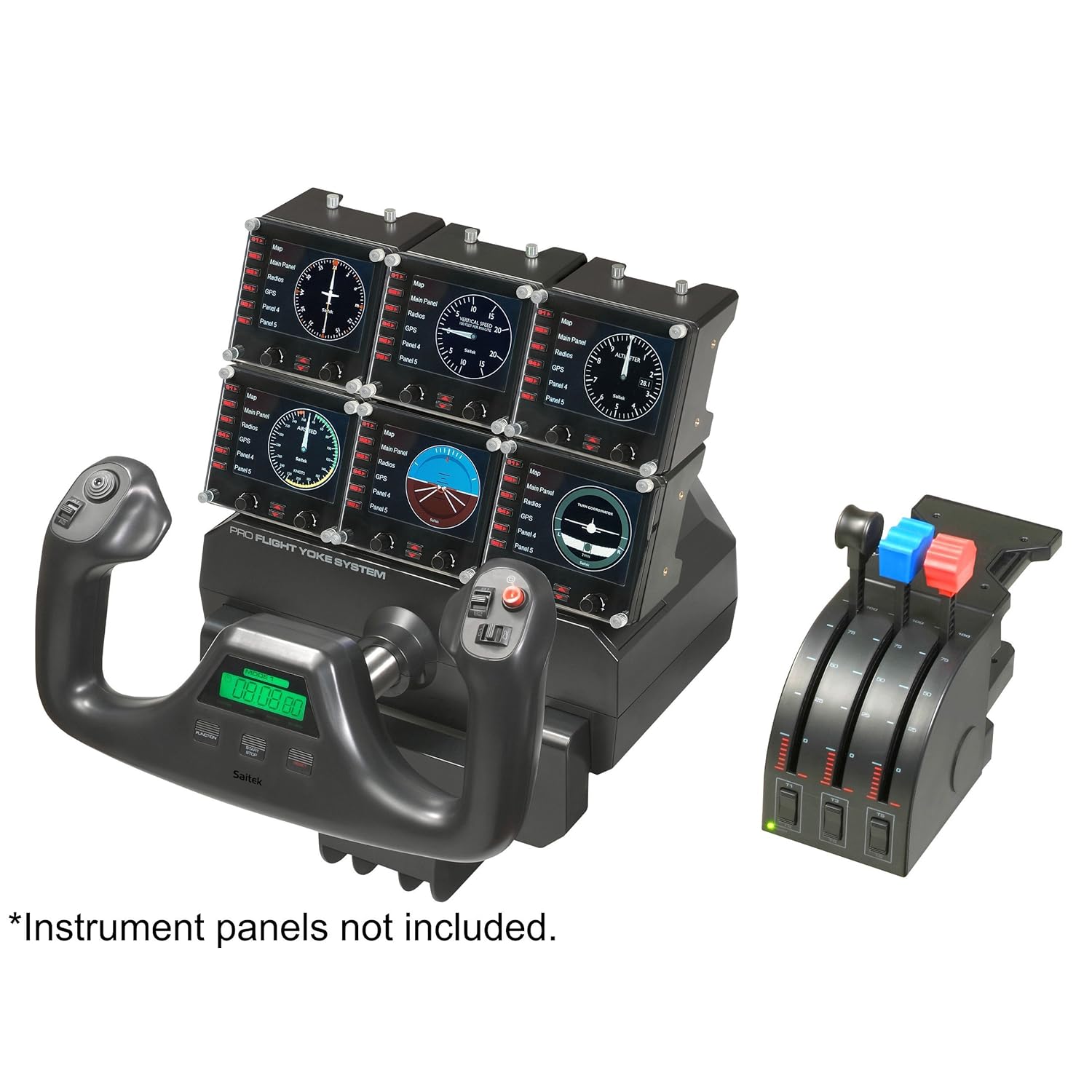
Saitek Pro Flight Yoke with Three-Lever Throttle (PZ44)

Saitek Pro Flight Yoke with Three-Lever Throttle (PZ44)

by Saitek

When paired with MS Flight Simulator X (FSX), this hardware proved to be a major improvement over my Logitech Force Feedback joystick. Force feedback would have been a nice addition, but experience with two Logitech joysticks proved the feature stops working within a few months of initial use. 

The Yoke and Throttle easily attached to my computer desk without damage to the latter. The Throttle is small enough that I left it attached when not using FSX; the Throttle connects to the Yoke using a PS/2 style connector. The Yoke is easily removed when I have to get down to business. 

The Yoke is substantial in appearance and flawless in operation. None of the firmware problems cited in early reviews were evident. A little Vaseline petroleum jelly on the metal cylinder was all that was needed to ensure smooth yoke movements. 

The Yoke and Throttle are very well supported by FSX. Its use with FS9 (2004) and X-Plane 9 were notably less encouraging. The hardware was released three years after FS9. My brief experience with X-Plane 9 suggests that even superior hardware cannot makeup for inferior software.


Apple Mac Mini MC438LL/A Server

the server version of the Mac Mini because of 3 main reasons: 
1) Comes with two 500GB hard drives for a total of 1TB. Yes, you do not get a DVD drive with this. I was able to use a 2 year old USB Sony DVD writer no problem. I only had to use the drive once when I first installed additional software onto the machine, and I have not found myself missing the DVD drive at all since then. 
2) High performance 7200 rpm hard drives 
3) Faster 2.66 process standard 
4) Has all kinds of server goodies built-in for free. It's like a Small Business Office In A Box. By the way, you don't have to use the server features if you don't want to. 

* Best of all, you can run all the normal desktop apps on it just like on a regular Mac. We have Aperture, Photoshop, Lightroom, etc. running on it no problem. 

Other PROS: 
- Compact. Great looking design. 
- Very Quiet 
- Great as a central photo store for the whole family. We used the Aperture 3 library management feature and are able to merge photos in from multiple people. Users can also "checkout" a subset of the library for editing, and them re-merge it back it. Pretty handy. 
- There is a feature for you to take over (remote control) the server remotely over the network, from another Mac. This is very handy. 

Cons: 
- Keyboard and mouse not included


Apple iPod classic 160 GB Black (7th Generation) NEWEST MODEL


So you saved up your money and decided Apple's iPod Classic 160gb player is the one-for-you. That makes you pretty smart right away. While there are bargain and knock-off versions of the Apple brand players, none can compete with the design and development that Apple puts into their players.

The Apple iPod Classic 160gb player has all the features you want in a high-end player. For starters it is 160gb in size. Currently I have almost 2,000 songs on it which is made up of all of my music cd's plus several hundred songs I purchased from iTunes (the input software for the iPods). Many of the songs were FREE on iTunes but the bulk of my iTunes library are purchases.

The player has a click wheel not a touch screen interface. Before you say unh-unh and move on, let me assure you it is much easier to plug the iPod into your car stereo's input and control it without looking at the screen than the touch screen versions. In most states now looking at a gadget while driving will get you a hefty fine, distracted drivers account for mega death and destruction every year. So you can spin you finger around the wheel controlling the volume; you can click 'left or right' to skip songs forward or back. All of these selections can be done without looking at the screen. Now let's look at the software which is a FREE download where you can download your own cd's or purchase first class tracks of virtually any artist... that's iTunes. 

It's an Apple product that everyone can enjoy. I have had it on my computer for years and years. And Apple keeps updating it so it's on the cutting edge of functionality AND awesome-ness. Yes, I like Apple a lot, not gonna marry it, though. :) This player is also the newest in the lineage of Apple Classic players, the seventh generation. I was told the previous version had two discs to store on and this only has one which causes much less problems. Also has a rechargeable battery that most manufacturers WISH they could copy. I listen to mine at the gym thru Skullcandy earbuds and in the car thru my car's input and anywhere else you can imagine and I only charge it ONCE a week. It can last 10 hours going and going and going. 

Amazon reduced the price of this model (Black or Silver) by $25, Free ground shipping (see details)and not taxed. I saved almost $65 over the big W-mart... The Apple Classis 160gb player is the end-all player you can own. It does a lot of other stuff video, photos, podcasts and some games so you gotta get it. Just to be completely honest I bough an IPhone 4, best phone ever. Period. All others in the dust.....

Sony MDR7506 Professional Large Diaphragm Headphone

Sony MDR7506 Professional Large Diaphragm Headphone


Sony MDR7506 Professional Large Diaphragm Headphone

If you've read down far enough to find this review, you probably already know that these are the professional studio monitor headphones used by pretty much anyone with a mixing board - from Celine Dion to Slipknot, from NFL broadcasts to The Howard Stern Show, these are the way most recording artists and studios hear every note and nuance. If you're not already convinced, read on. 

Most new 7506 owners are awed by their headphones before even hearing them, at least by the packaging. The headphones themselves rest on gently tousled silver silk behind a clear plastic window emblazoned with a large gold "7506". The presentation alone gives the potential buyer the feel of buying a giant engagement ring, but the theatrics end once you open the box. Getting down to business inside is a very serious schematic diagram documenting the complete parts and assembly list of the fifty or so pieces that go into making this single pair of headphones, a 1/8" to 1/4" adapter (the screw-on type, a must for live use), and a pleather carrying pouch. 

The 7506s are visually almost an anti-climax to the packaging. The design is very basic and straightforward without any tricks or frills, but simplicity is part of the appeal here. Every detail has been engineered to work simply and simply work. The steel band size adjustment snicks into place confidently at each numbered groove. Both earcups rotate vertically a full 180 degrees on their hinges with ease. The 1/8" plug has an all-metal casing with a real rubber sleeve, as you'd find on actual pro audio music cables. The more deeply you look into each element of the design, the more you'll appreciate how much Sony also looked into it. 

Putting on the 7506s is also an easy affair, thanks to their eight ounce weight and modest profile. They're actually small enough that you could get away with wearing them in public, but you wouldn't hear much else - the closed design combined with cushy stuffed vinyl pads and secure, if not tailored, fit means the ambient sound isolation borders on noise-cancelling. The earcups can also be folded upwards against the inside of the headband for portability - so portable in fact, that you could place a folded set of 7506s in a child's lunchbox *with room to spare*. 

But if ever a good thing came in a small package, it's the big sound of these headphones. Ruler flat response, deep sound stage, and sniper tight accuracy means every aspect of the source signal comes to life and is revealed in full. Bass notes come through with such authority that you find yourself occasionally making note of your feet, to see if you can feel the bass in the floor. Instrument placement is at once obvious - parsing out where each instrument and sound is in a mix is instantly clear. Previously hidden and obscure sounds and passages in various tracks stand out so well that entire songs are made new again. There just isn't any sound that the 7506s can't reproduce exactly as you'd hear it with your own ears. 

Those of you who like to tailor your sound with extra helpings of bass or volume have also been accommodated - On the low end, using even the most basic bass boost the 7506s can faithfully reproduce subwoofers-in-the-trunk neighborhood-wide bass *in your head*. I wouldn't have believed it if I hadn't heard it myself. Volume-wise, a low impedance matched with a high power handing capacity means these headphones are easily driven by an iPod or Walkman, yet can easily achieve volume levels that could liquefy your inner ear without even the implication of distorting. Plainly speaking, whatever you want the 7506s to do, they'll do it with ease. 

Keep in mind that revealing everything requires a good source. Plugging these into a cheaper portable or poorly EQ'd equipment will quickly make any and all limitations evident. This includes cheap computer audio hardware and low frequency/bandwidth MP3s. Uncompressed file formats suddenly seem a lot more practical when you can hear the constraints of highly compressed MP3s. 

"Audiophile" sites and reviews have had a hard time coming to grips with these headphones. Being that they're a consumer brand product available at any common music store at a fraction of the price of most other high-end models, the "elite" image and price tag that goes along with it just aren't a part of the 7506's game. It's reflected in some reviews, some saying they're "too bassy", others "too bright", but how exactly is this possible if you're using a decent source and the same headphones the musicians/engineers used to create the recording? You're hearing the music exactly as it was heard in the studio, exactly as it was meant to be heard. Only the 7506s can make that promise. 

If you're creating any kind of recordings and find yourself crossing your fingers that you're hearing it as it's actually being recorded, or just a music lover who feels it's time to hear the music as it was meant to be heard, you're only a hundred dollars away from the Sony MDR-7506. Five stars and my highest recommendation to Sony's masterpiece.
.

LinkWithin

Related Posts Plugin for WordPress, Blogger...
Ping your blog, website, or RSS feed for Free